Curriculum
Module 1 Peacekeeping
Unit 1. UN Peacekeeping
0/7
Unit 2. History of peacekeeping
0/7
-
1.2.1. A Short History of United Nations Peacekeeping: Part I
 Preview
-
1.2.2. History of UN Peacekeeping: Part II

-
1.2.3. UN Peacekeeping Changes for 70 Years
-
1.2.4. Vocabulary in context
-
1.2.5. Meet the Expert: PK Experience of an Officer from RNDC (video)
Preview
-
1.2.6. Grammar check: Past Simple Tense
-
1.2.7. Preparing and Presenting a PPP
Preview
Unit 3. Types of Peace operations
0/8

Unit 4. Civil-Military Cooperation In Peace Operations
0/8
Unit 5. Tactical communication in Peace operations
0/6
Final Vocabulary Check
0/1
1.2.7. Preparing and Presenting a PPP
1.2.7.1. Tips for a good PowerPoint presentation.
PowerPoint presentations are useful no matter what the topic is and whether you are presenting at a briefing or a conference. They help communicate ideas to your audience. Below are some useful tips on how to create a good basic PowerPoint presentation.
- Plan carefully.
- Know your audience.
- Time your presentation.
- Speak comfortably and clearly.
- Check the spelling and grammar.
- Do not read from your slides. The content of your slides is for the audience, not for the presenter.
- Give a brief overview at the start. Then present the information. Finally review important points.
- Do not turn your back on the audience. Try to position the monitor so you can speak from it.
- Limit the number of words on each screen. Include only essential information.
- Limit punctuation and avoid putting words in all-capital letters.
- Use good-quality images that reinforce and complement your message.
- Limit the number of slides. Presenters who constantly “flip” to the next slide are likely to lose their audience. A good rule of thumb is one slide per minute.
- Have a Plan B in the event of technical difficulties.
- Practice with someone who has never seen your presentation. Ask them for honest feedback.
- Do not speak to your slides. Many presenters face their presentation onscreen rather than their audience.
- Use fonts such as Arial or Helvetica. Avoid fonts such as Times New Roman or Palatino because these fonts are sometimes more difficult to read.
- Use no font size smaller than 24 point.
- Use the same font for all your headlines. Select a font for body and another for headlines.
- Use larger fonts to indicate importance.
- Use different colors, sizes and styles (e.g., bold) for impact.
- Avoid long sentences. Avoid abbreviations and acronyms. Avoid italicized fonts as these are difficult to read quickly.
- No more than 6-8 words per line.
- Use colors that contrast and compliment.
- Too may slides can lose your audience.
- Use one or two large images rather than several small images. Make images all the same size.
- Limit the number of graphical images on each slide.
Which of the tips do you find most useful? Why?
Source: Tips for Making Effective PowerPoint Presentations (ncsl.org)
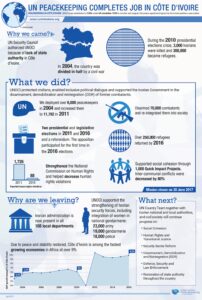
1.2.7.2. Examine the diagram about the successful UN Peacekeeping mission in Côte d’Ivoire (Ivory Coast). Be ready to answer teacher’s questions on the information on it.
1.2.7.3. Presentation skills
Visit the UN website https://peacekeeping.un.org/en/where-we-operate and find the map with the current UN Peacekeeping operations (e.g. UNMIK Kosovo, MUNISMA Mali, MINURSO Western Sahara, etc.). Choose one of them and prepare a short Power Point presentation (5-10 slides). Include information about:
- Resolution of the UN Security Council
- goal(s) of the mission;
- personnel involved and number of fatalities;
- contributing countries;
- funding.
NB: Don’t forget to include images/video in your presentation.
1.2.7.4. Present your PPP to your classmates